Página sin traducir
Esta página aún no está disponible en español. El contenido se muestra en inglés.
Video
Available settings depend on the stream codec and firmware.
Video Streams
The encoder offers H.264-1, H.264-2, and JPEG streams. Each stream can be disabled individually. Configure other video settings through the VMS where supported.
Consejo
Disable MJPEG if your application does not use it. This avoids enabling an unused stream inadvertently and potentially affecting H.264 performance.
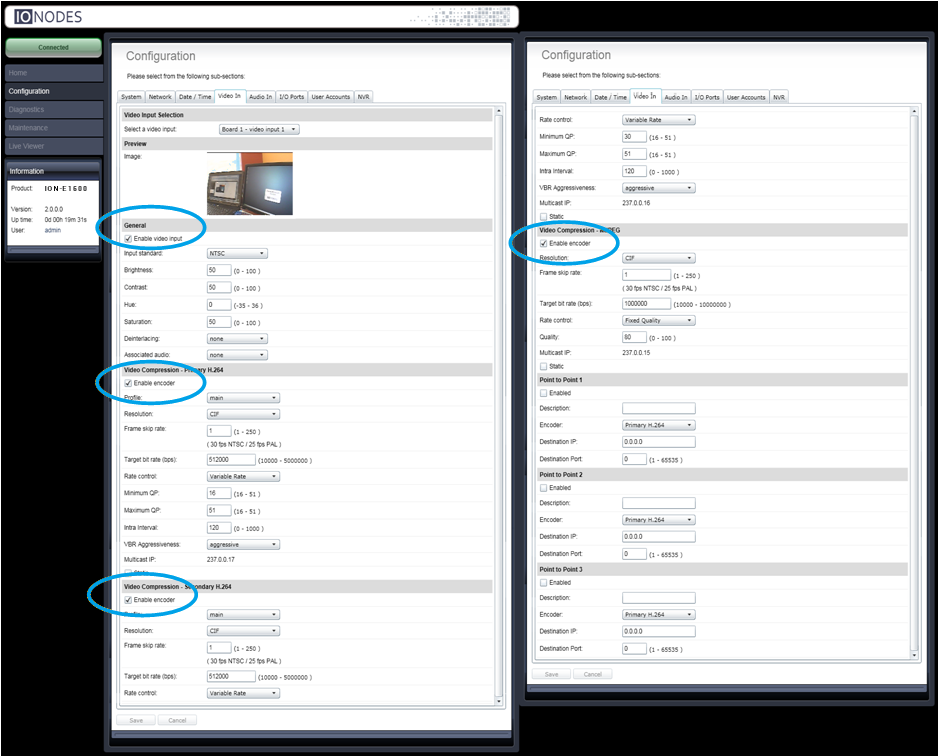
Video Input
| Parameter | Description |
|---|---|
| Audio Association | Associates an audio input with this video input. |
| Enabled | Enables or disables the video input. |
| Wide Conversion | Controls conversion between 16:9 and 4:3 aspect ratios. Stretch rescales the entire image to the new shape; Crop preserves proportions and discards pixels at the sides or top and bottom. |
Common H.264 and JPEG Settings
| Parameter | Description |
|---|---|
| Enabled | Enables or disables the codec. |
| Resolution | Selects the resolution of encoded images. |
| Target Bit Rate | Selects the target codec bit rate. |
JPEG
| Parameter | Description |
|---|---|
| Frame Rate | Specifies the JPEG frame rate, which the documented codec maintains regardless of rate-control selection. |
| Quality | Compression quality from 0 to 100; higher values provide better image quality. Applies to Fixed Quality rate control. |
| Rate Control | Variable Bit Rate prioritizes bit rate over quality. Fixed Quality uses the selected quality and varies bit rate accordingly. |
H.264
| Parameter | Description |
|---|---|
| Profile | Selects Baseline, Main, or High. See the profile comparison below. |
| Frame Rate | Specifies the codec frame rate. |
| Rate Control | Variable Bit Rate dynamically adjusts bit rate to meet target quality (QP) and frame rate. Constant Bit Rate prioritizes the target bit rate, varying quality first and frame rate as a last resort. |
| Min/Max QP | Sets the compression range. Lower values give better quality. Setting the minimum and maximum to the same value requests a specific quality setting. |
| VBR Aggressiveness | Controls how motion affects bit-rate calculations. Select Conservative, Moderate, Aggressive, or disabled. |
H.264 Profiles
- Baseline requires the least processing power but lacks some visual-quality optimizations.
- Main adds in-loop deblocking and CABAC encoding, increasing processing requirements.
- High adds adaptive 8x8 or 4x4 transforms.
The visual difference is generally greater between Baseline and Main than between Main and High, especially when image quality begins to degrade.
VBR Aggressiveness
In scenes without motion, the documented settings allow the bit rate to drop to these fractions of the target:
| Setting | Fraction of target bit rate |
|---|---|
| Conservative | 3/4 |
| Moderate | 1/2 |
| Aggressive | 1/4 |
Select disabled to turn off this motion-based adjustment.
Text Overlay
| Token | Inserted text |
|---|---|
%d |
Local date/time, yyyy-mm-dd HH:mm:ss |
%dz |
UTC date/time, yyyy-mm-dd HH:mm:ss |
%t |
Local time, HH:mm:ss |
%tz |
UTC time, HH:mm:ss |
%c[format] |
Local date/time using a custom format |
%cz[format] |
UTC date/time using a custom format |
Custom formats support:
| Token | Value |
|---|---|
%Y |
Four-digit year, 0000–9999 |
%y |
Two-digit year, 00–99 |
%m |
Month, 01–12 |
%B |
Month name |
%b |
Abbreviated month name |
%d |
Day of month, 01–31 |
%A |
Weekday name |
%a |
Abbreviated weekday name |
%H |
Hour, 00–23 |
%I |
Hour, 01–12 |
%M |
Minute, 00–59 |
%S |
Second, 00–59 |
%p |
AM/PM designation |
For example, %cz[%B %d, %H:%M] can produce September 20, 13:19 in UTC.