Página sin traducir
Esta página aún no está disponible en español. El contenido se muestra en inglés.
Buttons
This page summarizes the button actions available on the PERCEPT BC100.
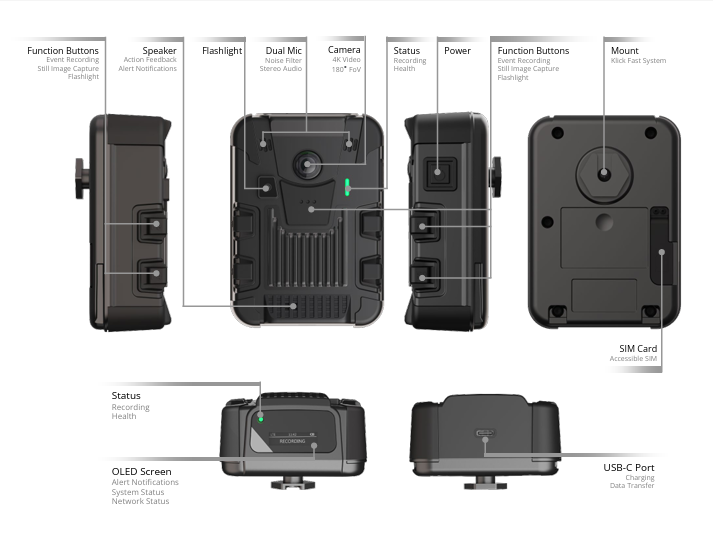
The BC100 has six physical buttons: two Function Buttons on each side of the chassis (F1/F2 on the left, F3/F4 on the right), one Function Button (F5) on the front, and the Power button on the side.
| Button Name | Action | Function |
|---|---|---|
| POWER | Press ≥3 sec (device off) | Power on |
| POWER | Press ≥5 sec (device on) | Power off |
| POWER | Press <3 sec | Cycle displayed status information (battery, storage, date/time, network, GPS, docking) |
| F5 | Press <3 sec (device on) | Start continuous recording |
| F5 | Press ≥5 sec | Stop continuous recording |
| F1 or F3 or F5 | Press >3 sec (device off) | Power on and start continuous recording |
| F1 or F3 | Press <3 sec | Start event recording, or tag an event if continuous recording is already active |
| F2 or F4 | Press <3 sec | Capture a still image |
| F2 & F4 | Press simultaneously <5 sec | Toggle flashlight on/off |
| F2 & F4 | Press simultaneously ≥5 sec | Change Wi-Fi configuration (scan a new setup QR code) |
| F1 & F3 | Press simultaneously ≥5 sec | Toggle privacy mode on/off [1] |
| F1 or F3 | Press ≥5 sec while docked | Change docking mode |
[1] Privacy Mode disables both audio and video, for live streaming as well as local recording; while active, the camera only sends a Privacy Mode logo when a live stream is requested. This mode is typically used when the wearer enters a restricted or private area, or is handed confidential documents. It can also be allowed or disallowed for a device from the web interface under Configuration > System.