Page non traduite
Cette page n'est pas encore disponible en français. Le contenu est affiché en anglais.
Maintenance
This section describes maintenance operations available from the PERCEPT Gateway management interface.
Conseil
All maintenance actions can also be performed from IONODES PERCEPT Cloud and are generally easier to use from there.
- Access the web interface either directly on the device in Configuration View or remotely from another computer.
- Log in with a Superuser or Administrator account.
- Open the Maintenance tab.
Diagnostic Reports
Use this operation to generate a diagnostic package for support. In the UI, this action is labeled Retrieve system information file.
- Open the Maintenance tab.
- Click Retrieve system information file.
- Save the generated file and share it with IONODES technical support when requested.
Note
The system information file contains technical diagnostics such as configuration details and logs used for troubleshooting. The file is encrypted and can only be opened by an IONODES technician.
Firmware Update
Use this operation to update the PERCEPT Gateway firmware from the web interface.
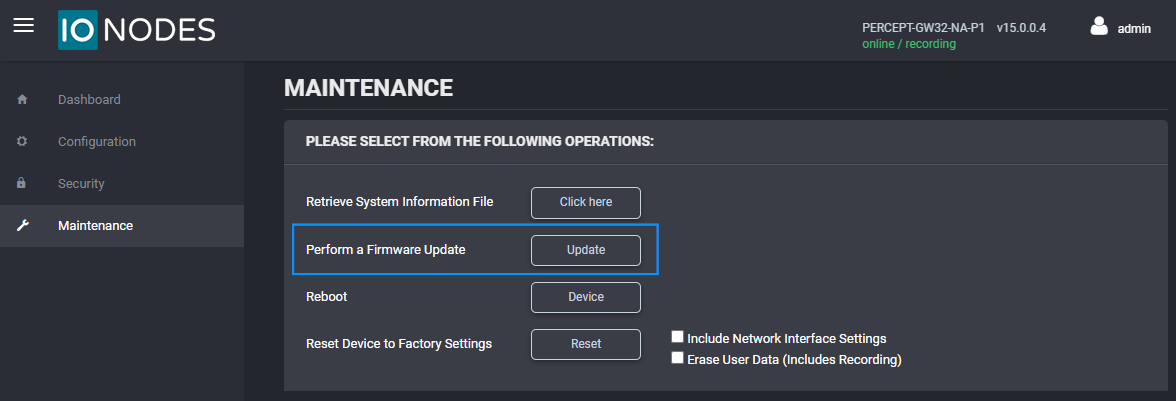
- Open the Maintenance tab.
- Click Update.
- Select the .iof firmware file provided by IONODES.
- Wait for the update workflow to complete.
Note
During the update process, the web page disconnects while the device reboots and then reconnects automatically.
Conseil
Stay on the Maintenance page to monitor update status messages as the operation progresses.
Reboot
Use this operation to restart the device without changing configuration.
- Open the Maintenance tab.
- Click Reboot.
- Confirm the action when prompted.
- Wait for the device to restart, then reconnect to the interface.
Factory Reset
Use this operation to restore factory settings from the management interface.
If the administrator credentials are lost, use the Safe Mode recovery procedure in Troubleshooting.
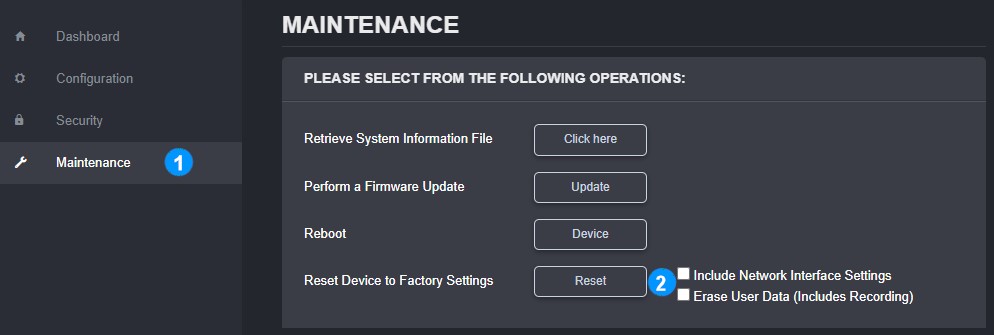
- Open the Maintenance tab.
- Click the factory reset action.
-
In the reset dialog, select the options to apply and confirm:
- Include Network Interface Settings resets all network settings and reverts to DHCP.
- Erase User Data deletes all video recordings saved on the device storage.
Avertissement
If you reset the network interface settings, the device may not reconnect to the network, depending on your network configuration.