Page non traduite
Cette page n'est pas encore disponible en français. Le contenu est affiché en anglais.
Security
This section allows the administrator to manage user accounts on the device (create account, remove account, reset user passwords). If the logged-in user has any role other than Administrator, this section only shows the option to change that user's own password.
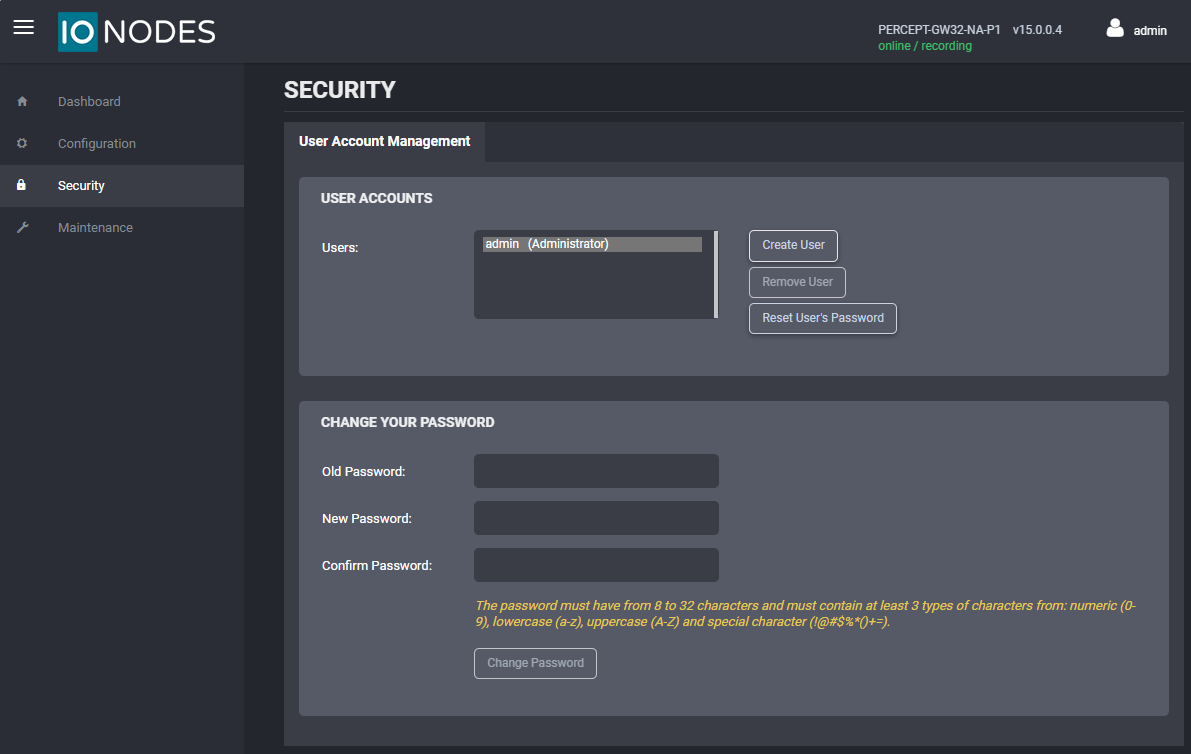
Clicking on the Create User button will open the dialog window shown below.
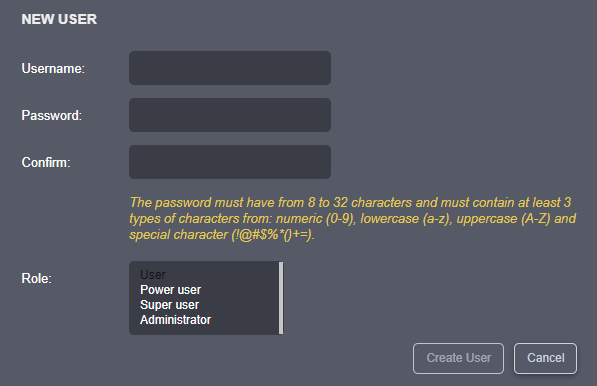
Each new user account must have a role assigned to it. There are four user roles available: Administrator, Superuser, Poweruser, and User. The table below summarizes the permissions for each role.
| Role | Description |
|---|---|
| User | Can access the system dashboard, including product information, system status, and resource usage. Can change their own password. |
| Poweruser | Includes all User permissions. Can change all configuration settings. Can access the Maintenance section, but cannot perform a firmware update or reset the device to factory default settings. |
| Superuser | Includes all Poweruser permissions. Can access all functionality in the Maintenance section. |
| Administrator | Includes all Superuser permissions. Can create or modify all user accounts. |
The built-in administrator account cannot be deleted. Password setup requirements are described in Admin Account Setup.
Avertissement
If the built-in administrator account password is lost, it cannot be recovered. To restore administrative access, perform a device factory reset. See Factory Reset.