System
General
The General section defines how the camera is identified and how its clock is maintained.
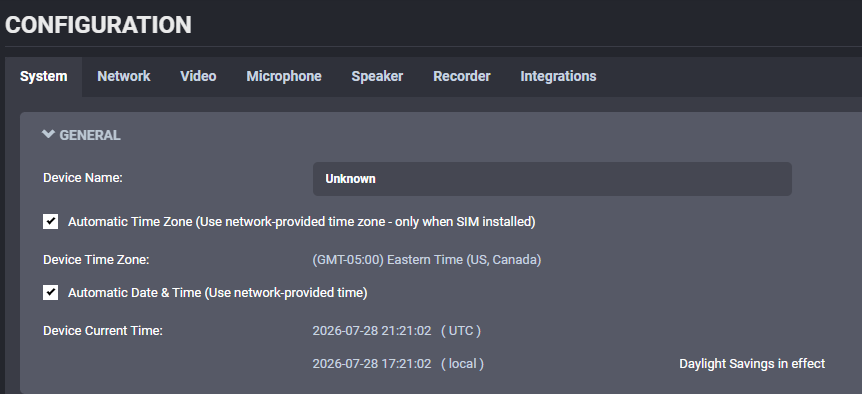
Key options in this section:
- Device Name: The label used to identify the camera in connected systems and management tools.
- Automatic Time Zone: Uses network-provided time zone information when available.
- Device Time Zone: Manual time zone selection for deployments that do not rely on network-provided time zone.
- Automatic Date & Time: Keeps the device clock synchronized automatically instead of relying on manual time entry.
- Device Current Time: Displays the current clock in both UTC and local format for quick verification.
NTP Configuration
Some deployments provide an NTP (Network Time Protocol) server so all devices on the network remain synchronized.

The NTP Server Address defines the time source used by the camera. When the server is reachable, the device clock stays synchronized automatically.
Use an internal NTP server when required by the customer network policy.
Security
The Security section defines password policy and failed-login protection for local accounts.
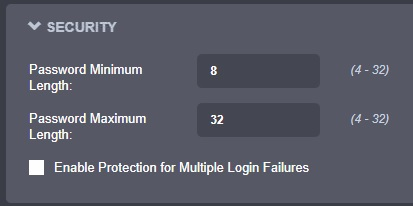
Available settings:
- Set minimum and maximum password length.
- Enable lockout protection for repeated login failures.
- Define lockout thresholds and duration.
Device
The Device section controls camera behavior options.
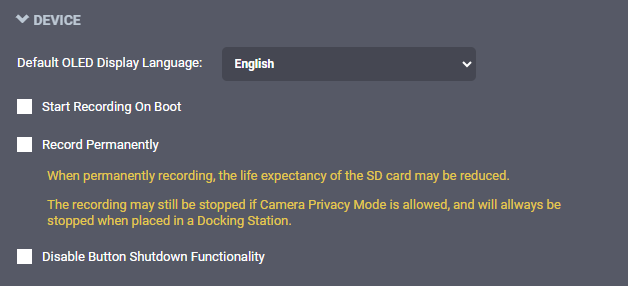
Common options include:
- Default display language.
- Start recording on boot.
- Record permanently.
- Disable button shutdown functionality.
Wearer ID
The Wearer ID section controls wearer assignment requirements and reset behavior.
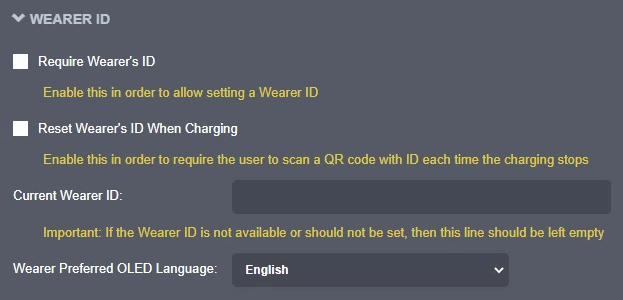
Require a wearer ID, control reset behavior when docked, and set the preferred display language for wearer prompts.
Docking Station
The Docking Station section controls docked online mode and docked media behavior.
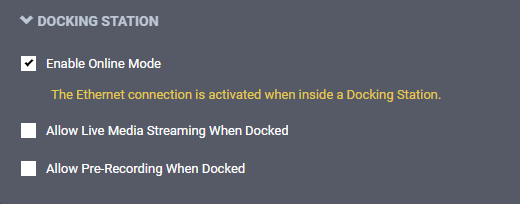
Configure dock-specific behavior such as online mode and docked media streaming.
Illuminators
The Illuminators section controls illuminator behavior and brightness.

GPS Configuration
The GPS Configuration section controls GPS sampling and related behavior.

Depending on firmware version and enabled features, additional controls may appear in this tab.