Buttons
This page summarizes the button actions available on the PERCEPT BC200.
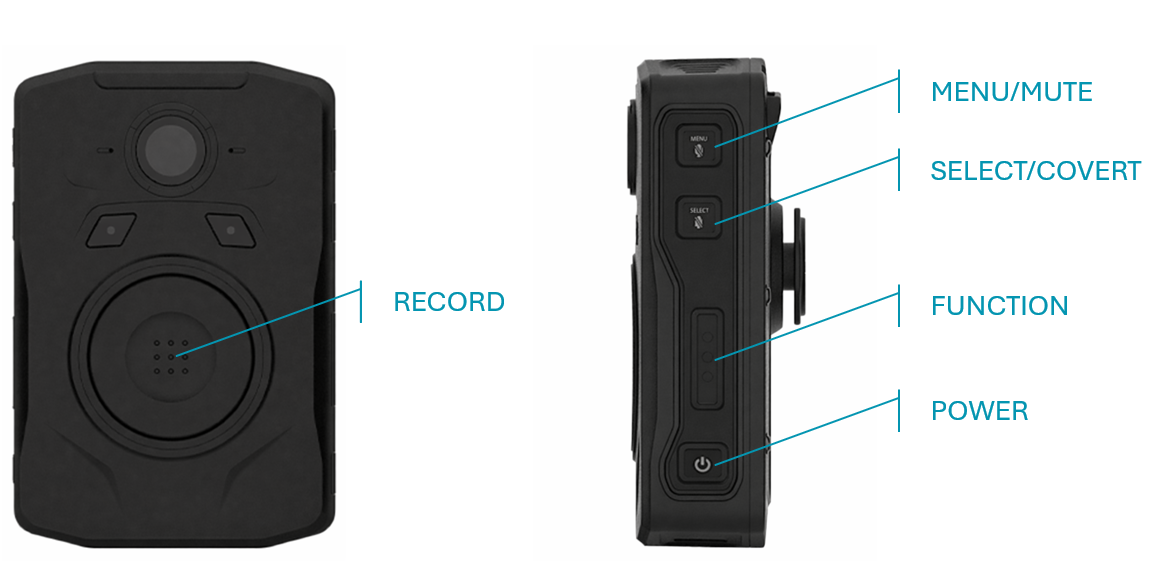
| Button Name | Action | Function |
|---|---|---|
| MAIN/RECORD | Short Press (<2 secs) | Start recording |
| MAIN/RECORD | Long Press (>3 secs) | Stop recording |
| MENU/MUTE | Short Press (<2 secs) | Go to next menu page |
| MENU/MUTE | Long Press (>3 secs) | Toggle mute on/off |
| SELECT/COVERT | Short Press (<2 secs) | Enter submenu or change a setting |
| SELECT/COVERT | Long Press (>3 secs) | Toggle covert mode on/off |
| FUNCTION | Short Press (<2 secs) | Open Functions menu, or go back one level in menus |
| FUNCTION | Long Press (>3 secs) | Toggle flashlight on/off |
| POWER | Short Press (<2 secs) | Return to home screen |
| POWER | Long Press (>5 secs) | Shut down device |
MUTE, COVERT, and FUNCTION button behavior are described in Functions.