Buttons
This page summarizes the button actions available on the PERCEPT BC100.
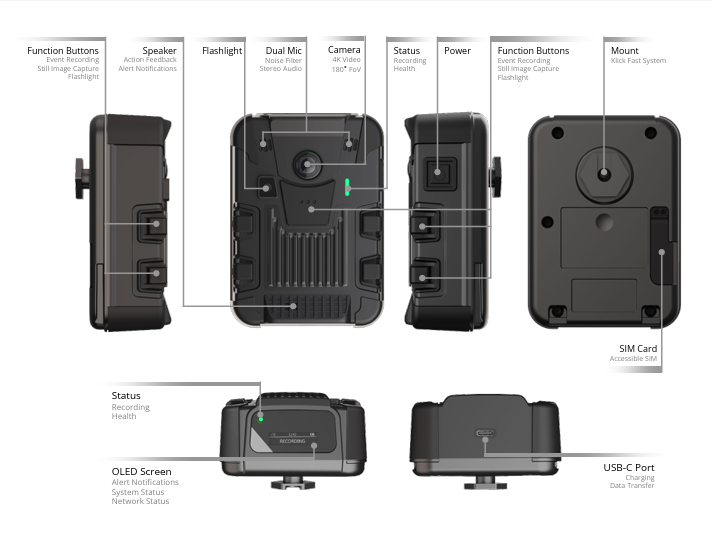
The BC100 has six physical buttons: two Function Buttons on each side of the chassis (F1/F2 on the left, F3/F4 on the right), one Function Button (F5) on the front, and the Power button on the side.
| Button Name | Action | Function |
|---|---|---|
| POWER | Press ≥3 sec (device off) | Power on |
| POWER | Press ≥5 sec (device on) | Power off |
| POWER | Press <3 sec | Cycle displayed status information (battery, storage, date/time, network, GPS, docking) |
| F5 | Press <3 sec (device on) | Start continuous recording |
| F5 | Press ≥5 sec | Stop continuous recording |
| F1 or F3 or F5 | Press >3 sec (device off) | Power on and start continuous recording |
| F1 or F3 | Press <3 sec | Start event recording, or tag an event if continuous recording is already active |
| F2 or F4 | Press <3 sec | Capture a still image |
| F2 & F4 | Press simultaneously <5 sec | Toggle flashlight on/off |
| F2 & F4 | Press simultaneously ≥5 sec | Change Wi-Fi configuration (scan a new setup QR code) |
| F1 & F3 | Press simultaneously ≥5 sec | Toggle privacy mode on/off [1] |
| F1 or F3 | Press ≥5 sec while docked | Change docking mode |
[1] Privacy Mode disables both audio and video, for live streaming as well as local recording; while active, the camera only sends a Privacy Mode logo when a live stream is requested. This mode is typically used when the wearer enters a restricted or private area, or is handed confidential documents. It can also be allowed or disallowed for a device from the web interface under Configuration > System.