Product Overview
Connections
The PERCEPT Gateway offers several connection ports at the front and back.
Front Panel
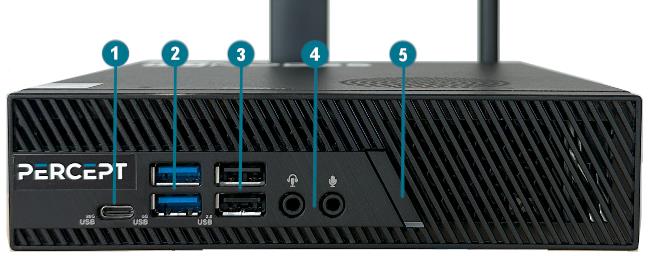
- USB 3.2 Gen2x2 Type-C Not required for typical deployments.
- 2x USB 3.2 Gen1 Type-A Not required for typical deployments.
- 2x USB 2.0 Can be used with a USB keyboard and mouse for configuration via the local interface.
- Mic in and Audio / Headset jack Not required for typical deployments.
- Power ON / OFF Button used to boot up or shut down the device. The button includes an LED indicating when the appliance is powered on.
Back Panel
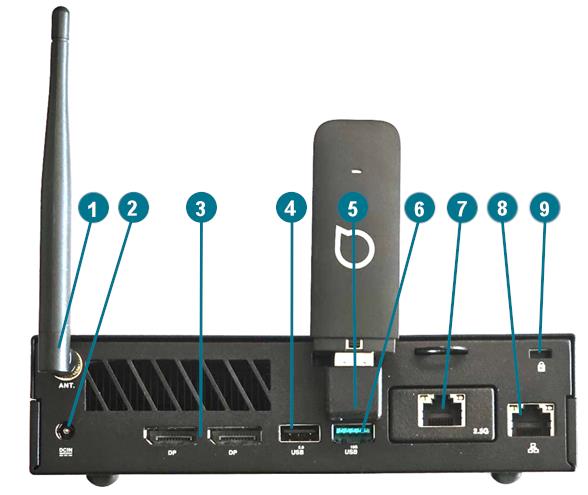
- Wi-Fi antenna The antenna needs to be installed prior to first use.
- DC-in Power Appliance power connector. Connect to the provided 20V DC power adapter.
- 2x DisplayPort 1.4 Not required for typical deployments. May be used in combination with a USB keyboard and mouse for configuration via the local interface.
- 1x USB 2.0 Not required for typical deployments.
- 1x USB 3.2 Gen2 Type-A Connect the LTE modem dongle in this USB port via the provided USB 90-degree angle adapter.
- 1x USB 2.0 Not required for typical deployments.
- 10/100/1000/2500 Mbps, 2.5G LAN Connect this network port to your Camera LAN, the LAN on which your IP cameras are located.
- 10/100/1000 Mbps, 1G LAN Connect this network port to your WAN (internet). This is not required if your Camera LAN provides internet access.
- Kensington Lock Use to physically secure the device to any compatible locking system.
Package Contents
| Qty | Description |
|---|---|
| 1 | IONODES PERCEPT Gateway appliance (GW08 or GW32 model) |
| 1 | Quick install sheet |
| 1 | Cellular modem USB dongle with pre-installed and pre-activated SIM card |
| 1 | 90-degree angle USB adapter for cellular modem USB dongle |
| 1 | Wi-Fi antenna |
| 1 | 20V DC power adapter |
| 1 | VESA/wall mounting bracket and screws |
Note
When unpacking, inspect the shipment box and appliance to identify any possible damages from shipping. Make sure all items have been delivered and that no item is missing. Contact your IONODES representative should you find any damages or defects.
Note
The product serial number label helps the IONODES product support team identify your device and its factory configuration if your PERCEPT Gateway or its components require service. It also includes unique ID required to enrol the device in PERCEPT Cloud. The label is attached on the underside of the enclosure and on the box.