Page non traduite
Cette page n'est pas encore disponible en français. Le contenu est affiché en anglais.
Product Overview
Connections
The ION-R300 offers several connection ports.
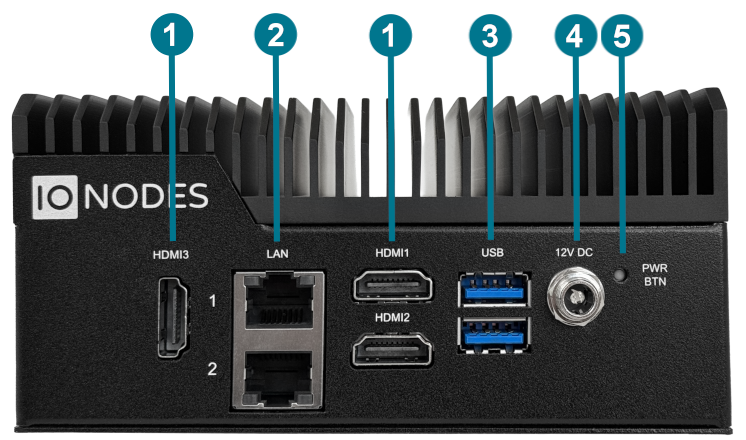
-
3x HDMI HDMI 2.0 connector interfaces for video outputs at resolutions up to 4K60Hz.
-
2x 10/100/1000/2500 Base-T Ethernet ION-R300 Ethernet network ports. Use RJ45 CAT5e or CAT6 network cables. Note that the ION-R300 cannot be powered using Power-over-Ethernet (PoE).
-
2 x USB 2.0 General purpose USB connector interfaces. Can be used to connect an optional keyboard or mouse.
-
Power IN Appliance power connector. Connect to the power supply block provided with the appliance (12VDC lockable plug).
-
Power Button (recessed) The recessed power button can be used to turn the unit on or off. Unless the ION-R300 is powered down using this button, it will start as soon as input power is applied.
Package Contents
| Qty | Description |
|---|---|
| 1 | ION-R300 appliance |
| 1 | 12V DC power supply with US power cord (EU/UK power cords are optional) |
| 1 | VESA mounting bracket and screws |
| 1 | Product flyer |
Note
When unpacking, inspect the shipment box and appliance for shipping damage. Verify that all items have been delivered. Contact an IONODES representative if any damage, defects, or missing items are identified.
Note
The product serial number label allows IONODES product support to identify the device and its factory configuration when service is required. The label is attached to the underside of the enclosure.